
Every outbound team runs on contact data, and almost nobody defines it before they buy it. You end up comparing a $49/month tool against a $31,875/year contract without a shared vocabulary for what is actually being sold.
This guide defines the terms, shows what the data looks like when it decays, and gives you a checklist for evaluating a provider before signing anything.
What contact data actually is
"Contact data" is shorthand for three different layers that vendors bundle and price together:
- Person-level data — name, job title, seniority, department, work email, direct dial, LinkedIn profile, location.
- Company-level (firmographic) data — legal name, domain, industry, headcount band, revenue band, HQ location, technologies in use.
- Signal data — things that changed recently: a funding round, a new executive, a job posting, a website relaunch.
The first two describe a static picture. The third tells you when to act, which is why it is usually the most expensive layer and the first one vendors put behind a higher tier.
The fields that actually matter
Not every field earns its place. In practice, the ones that change an outbound outcome are:
| Field | Why it matters | Typical reliability |
|---|---|---|
| Work email | The channel you'll actually use | Varies wildly; must be verified |
| Job title + seniority | Decides whether the person can buy | Good, but decays with promotions |
| Company domain | The join key for everything else | Very high |
| Headcount band | Qualifies deal size | Good at bands, poor at exact counts |
| Direct dial | Highest-intent channel | Lowest reliability, highest price |
| Funding date + stage | Tells you when to reach out | Sparse in generic databases |
A database can be enormous and still useless if the only reliable fields are the ones you could have looked up yourself.
How fast contact data goes stale
This is the part most buyers underestimate. B2B contact data decays at roughly 2.1% per month, which compounds to about 22.5% per year — the benchmark originally published in HubSpot's database decay research and still the most widely cited figure in the industry.
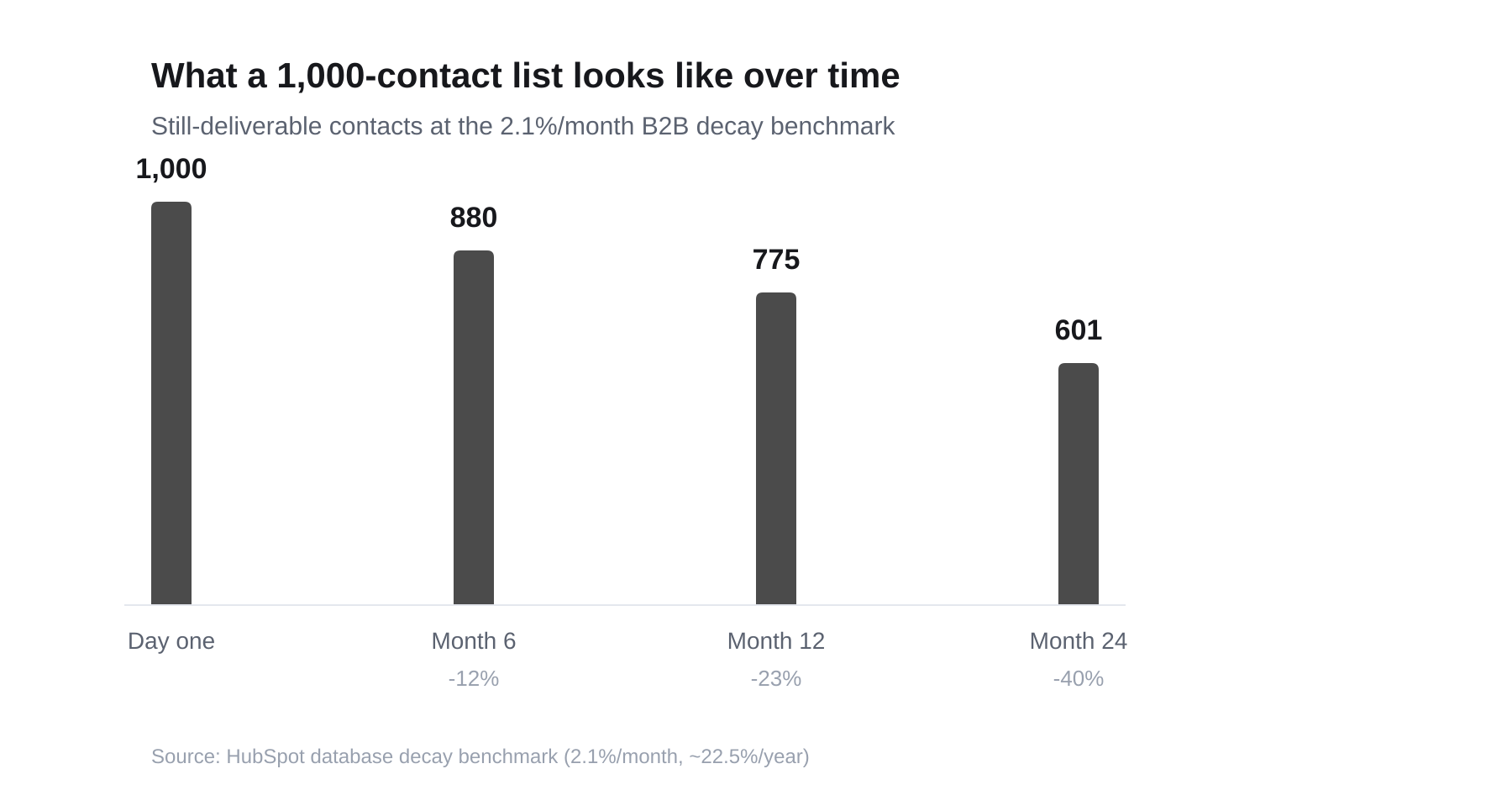
A 1,000-contact list at the industry-standard decay rate. After two years, 40% of it is dead weight.
Other measurements land in the same range or worse:
- Email addresses decay fastest among person-level fields, with roughly 23% of addresses in a typical list going bad each year.
- Phone numbers are worse — commonly estimated at 25–35% annually, a figure that got meaningfully worse after the shift to remote work invalidated large numbers of fixed office extensions.
- Dun & Bradstreet has put overall B2B record decay as high as 30–40% per year, depending on industry.
- High-mobility sectors — technology, financial services, professional services — decay faster than the average.
The practical consequence: a list you bought in January is a meaningfully different asset by December, and nobody sends you a notification when it degrades.
What "verified" actually means
"Verified" is the single most abused word in this category. Vendors use it to mean at least four different things, and the difference determines whether your emails land.
The verification ladder
From weakest to strongest:
- Syntax check — is it a validly formatted address? Catches typos, nothing else. Essentially free.
- Domain and MX check — does the domain exist and accept mail at all? Catches dead companies and typo'd domains.
- Disposable and role-account detection — is this a throwaway domain, or a generic
info@/sales@inbox rather than a named human? - Mailbox-level (SMTP) check — does this specific mailbox exist? The strongest signal, and the one many providers quietly skip because mail servers increasingly refuse to answer.
A tool that runs steps 1–3 and calls the result "verified" is not lying exactly, but it is not telling you what you think it is. The honest presentation is a status plus a confidence score, so you can decide your own risk tolerance:
- Verified — confirmed against a mailbox-level source.
- Probable — passed every deterministic check, but no mailbox confirmation.
- Unverified — on file, not yet checked, treat as a guess.
Adamlead runs this ladder in-house on every contact and shows the status and a 0–100 confidence score on the record rather than flattening it to a green checkmark. You can test the same logic on any address with the free email verifier.
Where contact data comes from
Understanding sourcing tells you a lot about the quality you're buying:
- Public web crawling — company sites, press releases, team pages. Cheap and broad; accuracy depends entirely on refresh frequency.
- Contributory networks — users install an extension or sync a mailbox, and their contacts feed the pool. Large volumes, murky consent, and the source of most "how does this vendor have my personal number" stories.
- Licensed third-party data — bought from other data brokers. Convenient, but everyone buying from the same broker has the same list.
- First-party enrichment — the vendor verifies and enriches records itself against primary sources.
Most large databases are a blend, weighted toward contributory data because it scales cheapest. That is also why the same stale record often appears in several competing tools simultaneously.
How to evaluate a provider before you pay
Run this checklist before a demo, not after:
- Ask for the verification definition in writing. Specifically: does "verified" include a mailbox-level check, and what is the measured bounce rate on a sample?
- Ask when the record was last checked, not when it was first collected. A 2023 record re-confirmed last week is worth more than a 2026 record never re-checked.
- Test a sample in your own ICP, not the vendor's demo segment. Coverage is never uniform — a tool that's excellent in US SaaS can be thin in European manufacturing.
- Check the export terms. Some contracts license you the data only while you're a subscriber, which makes churning expensive by design.
- Price it per usable record, not per seat. A cheap seat with unusable coverage in your segment is not cheap.
- Confirm the credit model. Look specifically for whether re-revealing a contact you already unlocked costs a second credit.
The questions that actually separate vendors
- What percentage of your emails carry a mailbox-level confirmation, as opposed to a pattern guess?
- How often is the database re-verified end to end?
- Do you charge again for the same record next quarter?
- Can I see funding or hiring recency on the company, or only static firmographics?
Where signals change the calculation
A static database answers "who exists." A signal answers "who is worth contacting this week." That difference is the entire reason recency data costs more.
A company that closed a round last month is actively spending, actively hiring, and has not yet locked in vendors. The same company eighteen months later is a much colder prospect with identical firmographics — the static record cannot tell the two apart.
This is the specific gap Adamlead is built around: every company in the directory has a known funding date, contacts carry a real verification status, and open roles are pulled from the company's own careers page. You can browse recently funded startups to see the data before creating an account.
The short version
- Contact data is three layers — person, company, and signal — priced as one product.
- It decays about 2.1% per month; a quarter of your list dies annually without anyone telling you.
- "Verified" is a spectrum, not a binary. Demand a status and a confidence score.
- Evaluate on usable records inside your ICP, not database size.
- Static firmographics tell you who exists; recency tells you when to act.
If you want to go deeper on the verification side specifically, read B2B sales email verification techniques that actually work.
Decay figures: HubSpot database decay benchmark; Dun & Bradstreet commercial data research. Verified September 2026.