
Buying a list is the fastest way to get 10,000 contacts and the fastest way to destroy a sending domain. Building one properly takes longer and produces something you can actually send to for years.
This is the practical method: how to define who belongs on the list, where to source contacts, how to verify before the first send, and what the law actually requires.
Why purchased lists fail
The economics look appealing — 50,000 contacts for a few hundred dollars — until you look at what arrives.
- Bounce rates are catastrophic. The industry average bounce rate across all senders is around 5.1%, and purchased lists sit well above that. Anything over 5% means you stop sending, so a bought list can burn your domain before the first campaign finishes.
- Everyone else bought it too. Brokers sell the same records repeatedly. The people on it have been contacted by dozens of companies with near-identical messaging.
- It was already decaying when you bought it. B2B data decays about 2.1% per month (≈22.5% a year). A list compiled eighteen months ago has lost roughly a third of its deliverability before you touch it.
- There's no consent trail. Under GDPR you need a lawful basis for processing. "We bought it" is not one you'd want to defend.
The one legitimate exception
Licensed data from a reputable provider, verified at the point of delivery, with documented sourcing, is a different product from a scraped list sold by the megabyte. The distinction is whether the vendor can tell you where each record came from and when it was last checked. If they can't, it's the bad kind.
Step 1: Define the list before you build it
Most bad lists are bad because nobody wrote down the criteria first. Define:
- The company profile — industry, size band, geography, and any hard disqualifiers.
- The trigger — what makes a company worth contacting now rather than eventually. Funding, hiring, a leadership change, a technology migration.
- The role — the specific titles that can say yes, plus the titles that can say no and block you.
- The exclusions — existing customers, active opportunities, competitors, and anyone who has opted out.
Write these as filters you could actually apply, not adjectives. "Fast-growing mid-market SaaS" is not a filter. "Software companies, 50–200 employees, raised a round in the last 6 months, US or UK" is.
Sizing it honestly
A tight list of 300 genuinely qualified companies outperforms 30,000 loosely matched ones on every metric that matters — reply rate, meeting rate, and domain health. If your criteria produce a list of 40,000, they aren't criteria.
Step 2: Source the contacts
Ranked by the quality of what you get:
- Your own audience. Newsletter subscribers, trial signups, webinar attendees, and inbound leads. Highest intent, unambiguous consent, and usually badly under-used.
- A verified contact database. The practical option for outbound at any scale — provided the vendor shows you a verification status rather than a checkmark.
- Manual research. Company sites, team pages, LinkedIn, conference speaker lists. Slow, accurate, and appropriate for a short high-value list.
- Public datasets and registries. Funding announcements, job boards, government registries. Excellent for triggers, thin on contact details.
- Purchased lists. Covered above. Don't.
Most real lists combine the top three: a database for breadth, manual research for the highest-value accounts, and your own audience for the warmest segment.
Sources compared
| Source | Cost | Accuracy | Volume | Consent trail |
|---|---|---|---|---|
| Your own audience | Free | Highest | Low | Unambiguous |
| Verified database | $29–$119/mo | High if re-verified | High | Vendor-documented |
| Manual research | Time only | High | Very low | Clear (public sources) |
| Public registries | Free | High for triggers | Medium | Clear |
| Purchased list | ~$0.01/record | Very low | Very high | None |
The bottom row is the only one where the cost per usable record exceeds every other option, despite having the lowest sticker price.
Step 3: Verify before you send
Non-negotiable, and cheap — verification runs roughly $0.0005 to $0.008 per email depending on volume and provider. Verifying a 5,000-contact list costs somewhere between $3 and $40.
The minimum sequence:
- Deduplicate so you don't pay twice for the same person.
- Check syntax, domain, and MX records — free, and it removes guaranteed bounces.
- Separate role accounts (
info@,sales@) from named humans. - Run paid verification on what's left.
- Segment by result — send to valid, hold catch-alls for a lower-volume secondary domain, delete invalid.
Target under 3% bounce on the first send, and under 1.5% if the list is properly verified.
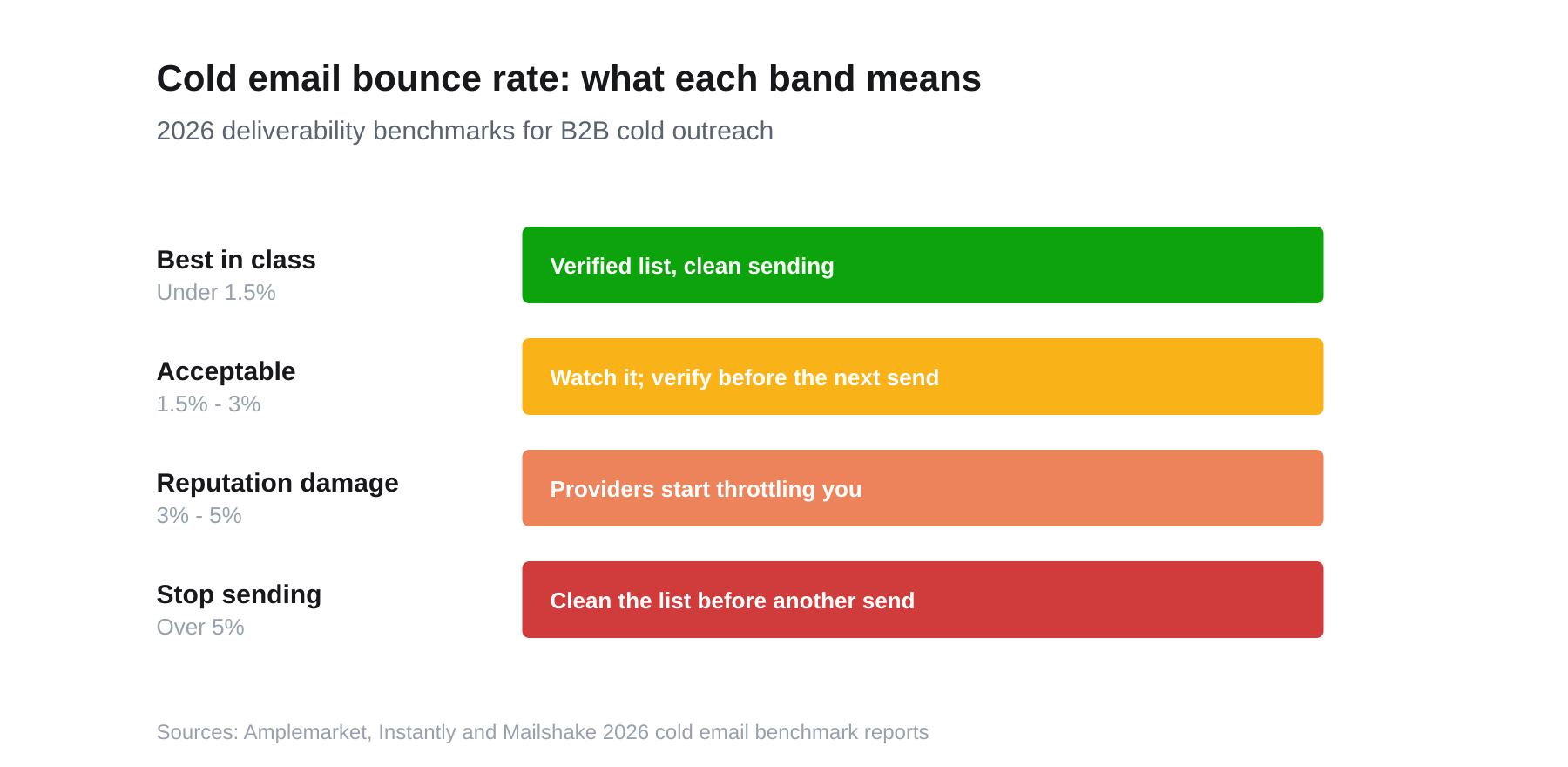
Where your first send lands on this chart determines whether the next six months of email reaches an inbox.
Our email verification guide covers the full ladder, and you can spot-check any single address with the free email verifier.
Step 4: Know the legal rules
Not legal advice, but the shape of the obligations in the two regimes most B2B senders fall under:
CAN-SPAM (United States)
- Opt-in is not required for B2B cold email.
- You must include a valid physical postal address.
- You must honour opt-outs within 10 business days, and the mechanism must be functional for at least 30 days.
- Headers and subject lines must not be deceptive.
GDPR (EU/UK)
- You need a lawful basis. For B2B prospecting this is usually legitimate interest, not consent — but legitimate interest requires a documented balancing assessment.
- The contact must be able to object easily, and you must stop when they do.
- You must be able to say where you got the data. This is the requirement that makes purchased lists genuinely risky.
- Business contact details for a role at a company are still personal data if they identify a person.
The practical takeaway: keep a record of sourcing per contact, honour opt-outs immediately rather than within the legal window, and don't email consumers as though they were businesses.
Step 5: Segment before you send
A single list sent a single message is the other reason lists underperform. Segment along the axis that changes what you'd actually say:
- By trigger recency. A company that raised three weeks ago gets a different opening line than one that raised last year. This is usually the highest-yield split.
- By role. The message that lands with a VP of Engineering is not the one that lands with a CFO, even at the same company.
- By company size. A 12-person startup and a 400-person company have different buying processes and different words for the same problem.
- By relationship. Someone who attended your webinar is not a cold contact, and treating them like one wastes the warmest thing you have.
How much personalisation actually pays
Personalisation has diminishing returns and a real time cost. A workable tiering:
- Tier 1 (top ~20 accounts): genuinely researched, one-to-one. Reference something specific and verifiable.
- Tier 2 (the main body): segment-level relevance — same message to everyone who raised a Series A in fintech this quarter.
- Tier 3 (the long tail): clean, short, honest, and unpersonalised beyond the basics. Don't fake depth you don't have.
Faked personalisation — the merge field that obviously came from a spreadsheet — performs worse than no personalisation, because it signals automation while claiming attention.
Step 6: Warm the sending infrastructure
A perfect list still bounces if the sending setup is wrong. Before the first campaign:
- Publish SPF, DKIM, and DMARC records for the sending domain. These are DNS records, they're free, and missing them is the most common self-inflicted deliverability wound.
- Send from a separate domain — a variant of your main domain — so a mistake doesn't damage the mail your company runs on.
- Ramp volume gradually. New domains that jump straight to hundreds of sends per day look exactly like spam infrastructure.
- Keep per-inbox volume modest and spread sends across the day rather than firing everything at once.
Step 7: Maintain it
A list is a perishable asset:
- Re-verify quarterly. At 2.1% monthly decay, three months costs you ~6% deliverability.
- Suppress aggressively. Opt-outs, hard bounces, and closed-lost accounts go on a permanent suppression list.
- Track bounce rate per segment, not just overall. One bad source can hide inside a good average.
- Prune non-engagers. Contacts that have ignored six sequences aren't going to convert on the seventh, and they drag your engagement metrics down.
A shortcut worth knowing
Steps 1 through 3 exist because raw contacts arrive without context or confidence, and you're reconstructing both. Sourcing from a database where the trigger and the verification are already attached collapses most of that work.
Adamlead is built for exactly one version of this list: companies that just raised funding. Every company has a known funding date, every contact carries a verification status and confidence score, and open roles come from the company's own careers page. Start free with 25 credits, or see the companies on file before signing up.
Bounce and decay benchmarks: 2026 cold email benchmark reports and HubSpot database decay research. Verification pricing checked September 2026. This article is not legal advice.