
"Sales intelligence" is a crowded category where a dozen vendors sell the same sentence: find the right person, at the right company, and reach them. What separates a tool worth paying for is what sits underneath the search bar — how the data is sourced, how often it's re-verified, and whether the pricing model punishes you for actually using it.
This guide covers what each major tool costs in September 2026, what it's genuinely best at, and how to assemble a stack without paying three times for overlapping coverage.
What sales intelligence actually covers
The category bundles four jobs that used to be four products:
- Search and filtering — find companies and people matching an ICP.
- Contact enrichment — attach an email, phone, and title to a name.
- Verification — confirm the contact details are deliverable.
- Signals and intent — surface companies doing something that suggests timing.
Most vendors are strong at one or two and adequate at the rest. Knowing which is which is the whole game.
Real pricing, September 2026
Published list pricing, annual billing where offered. Every vendor here discounts at volume, and the enterprise tiers are negotiated.
| Tool | Entry price | Mid tier | What you're actually buying |
|---|---|---|---|
| Apollo | Free tier | $49–$119/user/mo | Large contact database + sequencing |
| Hunter | Free (25 searches) | $34–$209/mo | Email finding + verification |
| Crunchbase Pro | $49/mo annual | $99/mo monthly | Funding and company intelligence |
| ZoomInfo | ~$15k/yr (3 seats) | $25k–$40k/yr | Enterprise database + intent |
| Clay | Free tier | $149–$800/mo | Enrichment orchestration across providers |
| Adamlead | Free (25 credits) | $29–$79/mo | Verified contacts at funded startups |
The numbers behind the table
- Apollo runs $49/user/month (Basic), $79 (Professional), and $119 (Organization) on annual billing, rising to $59/$99/$149 billed monthly. Professional includes roughly 6,000 credits per seat per month. The catch is the credit system: export credits and mobile credits are metered separately, and heavy outbound teams routinely overspend the sticker price.
- Hunter is $34/month (Starter, 500 searches and 1,000 verifications), $104 (Growth, 2,500 searches and 5,000 verifications), and $209 (Scale) on annual billing — about 30% below monthly rates. The free tier gives 25 searches and 50 verifications monthly.
- Crunchbase Pro is $49/month billed annually ($588/year) or $99 month-to-month, including 2,000 export rows per month.
- ZoomInfo is the outlier. Professional starts around $14,995/year for three seats, Advanced runs $25,000–$30,000, and Elite starts near $40,000. Vendr's marketplace data puts the median contract at $31,875/year across more than 1,300 verified purchases. There is a three-seat minimum and no self-serve option.
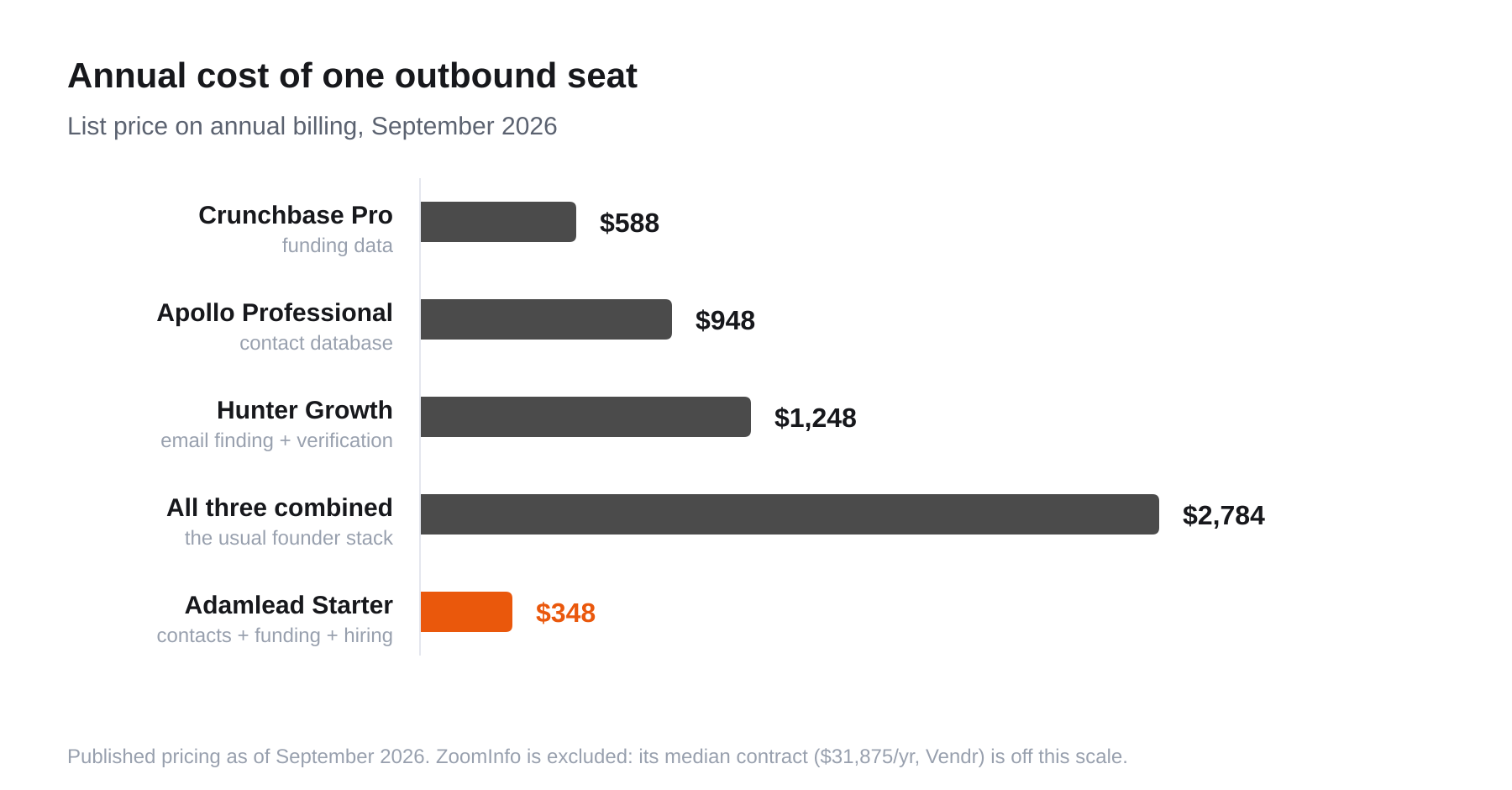
Annual list price for a single outbound seat. The common founder stack — one database, one verifier, one funding source — lands near $2,784/year before anyone sends an email.
What each tool is actually best at
Apollo — breadth and sequencing in one place
Apollo's real advantage is that search, enrichment, and email sequencing live in one product, so a small team can run outbound without stitching tools together. The tradeoff is data quality variance: coverage is enormous but re-verification is inconsistent, and bounce rates on untouched Apollo exports are a common complaint. Treat its emails as a starting point to verify, not a finished list.
Best for: small teams that want one tool for the whole outbound motion.
Hunter — the verification specialist
Hunter does two things very well: find an email from a domain and a name, and tell you whether an address is deliverable. It is not a database you browse; it's a lookup and verification layer. Its verifier is among the more conservative in the market, which is a feature — it returns "risky" rather than guessing.
Best for: verifying lists sourced elsewhere, and one-off founder lookups.
Crunchbase — funding intelligence
Crunchbase is the default for "who raised money recently." Its weakness for outbound is that it's company-level: you learn a company raised a Series A, then you still have to go find a human and an email somewhere else. That handoff is where most of the manual work in a founder's prospecting day actually goes.
Best for: market research and funding tracking, not contact acquisition.
ZoomInfo — enterprise coverage at enterprise prices
ZoomInfo's direct dial coverage and intent data remain genuinely ahead of the mid-market field, and for a large team with a real budget it is often the right answer. For anyone under about ten reps, the math rarely works: a median $31,875/year contract is more than most seed-stage companies spend on their entire GTM tooling stack.
Best for: teams of 10+ reps with budget and a procurement process.
Clay — orchestration, not data
Clay is frequently miscategorised as a database. It's a workflow layer that calls other providers' APIs and waterfalls between them until a field fills. Powerful, and genuinely the best answer for complex enrichment — but it assumes you're already paying for the underlying data sources.
Best for: ops-minded teams building custom enrichment pipelines.
A note on intent data
Intent data is the most aggressively upsold line item in this category, and the least well understood. Two very different things get sold under the name:
- First-party intent — activity on your own properties: pricing page visits, doc views, repeat sessions. Reliable, because you observed it directly.
- Third-party intent — a vendor infers that someone at a company researched a topic somewhere across a publisher network, then sells you the company name. This is probabilistic, account-level rather than person-level, and typically arrives days after the behaviour.
Third-party intent is where the money goes and where the disappointment usually follows. Before paying for it, ask three questions:
- Is it person-level or account-level? Almost always account-level. "Someone at a 4,000-person company read about CRMs" is a weak trigger.
- What's the latency? A signal delivered a week late has lost most of its value.
- How is the baseline set? Large companies generate background research noise constantly, so naive models flag them permanently.
A concrete, dated event — a funding round, a new job posting, a leadership change — is usually a stronger and cheaper trigger than an inferred topic surge, because it actually happened and you can see the evidence.
How to assemble a stack without paying twice
Most overspending comes from buying three tools whose coverage overlaps. A sane sequence:
- Start with the signal, not the database. Decide which companies are worth contacting this quarter before buying breadth you won't use.
- Buy one source of contacts, not two. Two databases with 70% overlap is not redundancy, it's double billing.
- Always own a verification step — either bundled or a standalone verifier. This is the cheapest line item and the one that protects your domain.
- Add orchestration last. Clay-style tooling multiplies a good stack and does nothing for a bad one.
- Re-price annually. Discounts of 30–65% off ZoomInfo list are common at renewal, and mid-market vendors routinely match a competitor quote.
Where a narrower tool wins
The comparison above has a gap: every one of those tools sells you breadth, and breadth is not what most early-stage sellers actually need. If your ICP is "startups that just raised," you're paying for millions of records to reach a few hundred relevant ones — and still doing the funding-to-human handoff manually.
Adamlead narrows deliberately: every company in the directory has a known funding date, contacts carry a verification status and confidence score, and open roles come from the company's own careers page. Starter is $29/month for 500+ verified contacts, Growth is $79 for 2,000+ — roughly an eighth of the combined stack above. Browse recently funded startups to see the actual data first, or read the full breakdown of replacing Apollo, Hunter and Crunchbase.
All pricing verified against published vendor pricing pages and Vendr marketplace data, September 2026. Negotiated and enterprise pricing will differ.